
The Yealink MVC S98 is Yealink’s most advanced Microsoft Teams Rooms (MTR) solution, built specifically for extra-large, ProAV environments. It combines multiple SmartVision 80 4K PTZ cameras, the powerful MCore 4 mini-PC, and the 11.6″ MTouch Plus touch console into a turnkey bundle. This integrated system is certified for Teams and designed to transform hybrid meetings in boardrooms, divisible conference spaces, training halls, and auditoriums. Not only does S98 support Microsoft Teams Rooms natively, but its hardware and software are optimized for Teams’ latest AI-powered features like meeting transcription, speaker recognition, and Copilot integration.
From the outset, Yealink emphasizes that S98 delivers “advanced AI features powered by an unrivalled four-lens camera system and future-proof computing power,” supporting “easy deployment & flexible design and seamless ProAV integration”. In practice, this means organizations can deploy S98 in complex spaces – with multiple cameras, screens, and zones – while maintaining a simple, unified Teams user experience. The all-in-one package addresses the very challenges of large-room collaboration: ensuring every participant is seen and heard clearly, regardless of their distance from the display or across a room partition, and enabling the meeting to leverage Teams’AI capabilities fully.
The Need for High-Impact Spaces in the Hybrid Era
As hybrid work models become the norm, enterprises are rapidly rethinking their meeting spaces. Industry analysts underscore the explosive growth of “high-impact spaces” – conference rooms and halls outfitted with professional AV and intelligent collaboration technology. For example, Frost & Sullivan reports that high-impact spaces (e.g. divisible boardrooms, executive spaces, training rooms, auditoriums) are projected to nearly double worldwide from 6.4 million in 2022 to 11.3 million by 2025. These spaces are defined by professional-grade AV, dynamic scalability, and rich user experiences – precisely the environments where solutions like the MVC S98 excel.
A key driver of this trend is the need for equitable, high-quality experiences for both in-room and remote participants. Frost’s research highlights that organizations are prioritizing reliability, quality, and robustness in conference tech so that “technology works every time with minimal support,” and that ensuring “equitable experiences for remote and onsite meeting participants” is now a top concern. Similarly, IDC notes that global UC&C (Unified Communications & Collaboration) spending is growing (the market reached $69.2B in 2024 and is expected to hit $85.4B by 2029),driven largely by investments in hybrid work solutions. IDC observes that “businesses are recognising the value of AI in UC solutions” and that new AI capabilities are transforming the collaboration market.
This data underlines the imperative: enterprises need scalable, intelligent Teams-enabled solutions to equip their large meeting rooms and high-impact spaces. The MVC S98 is positioned to meet this demand by combining Yealink’s latest camera and compute hardware with Teams Rooms integration.
Multi-Camera Intelligence for High-Impact Spaces
Traditional videoconferencing kits often rely on a single camera at the front of the room – adequate for small rooms, but insufficient for large or divisible spaces. The MVC S98 takes a different approach: it uses multiple SmartVision 80 cameras working in tandem to cover every zone of a room. Each SmartVision 80 is a quad-lens, 4K PTZ camera (with wide, dual telephoto, and PTZ lenses) that delivers up to 20x optical zoom, ensuring even distant participants are captured clearly.
Yealink’s multi-camera systemcensures every person in a large or partitioned room is seen from the best angle. The S98 supports intelligent camera features like IntelliFocus, which smoothly brings live close-ups of active speakers to the fore. With IntelliFocus, each participant actually gets their own video stream (with name tag) in Teams, so remote attendees see every speaker front-and-center. A built-in Presenter Tracking mode provides “smooth, lossless tracking” up to 20 meters, automatically following the presenter with crystal-clear clarity. In practice, this means a meeting can span multiple cameras – for example, covering both the front presenter area and back-seat attendees – without manual camera switching or blind spots.
These AI-driven camera features solve common AV challenges in large rooms. For instance, in a divisible boardroom with two partitions, each partition can have its own camera view and the S98 system will dynamically manage which camera is shown to the remote audience. In training halls or U-shaped rooms, the system can focus on both the instructor and the audience when they speak. By contrast, a single-camera system might leave half the room off-screen or require cumbersome manual switching. Yealink’s approach ensures every participant is clearly visible and heard, yielding a more inclusive and engaging hybrid meeting.
AI 3.0 and Deep Teams Integration
Yealink has embraced what it calls the “AI 3.0” era of conferencing. This aligns closely with Microsoft’s own vision of AI-enhanced Teams Rooms. The S98’s hardware is optimized for Microsoft Teams’ latest AI features. For example, Teams Rooms can now use speaker recognition to attribute every spoken contribution to the correct person, enabling features like Copilot meeting summaries and per-person transcripts. Yealink highlights that their system supports “Microsoft Copilot with People Recognition through facial/voice” and “intelligent perception of environment, people and behaviors” as part of AI 3.0. In fact, Yealink explicitly mentions multi-stream IntelliFrame with Copilot: each person has their own video feed and name, and “the system intelligently recognizes and tracks who said what through voice and facial recognition”.
Microsoft emphasizes that identifying each speaker is essential for Copilot to work (so summaries and action items are accurate). The combination of S98’s cameras and Yealink intelligent audio makes this possible. The SmartVision 80 cameras have built-in microphone arrays for sound localization, complementing Teams Rooms’ intelligent speakers and enabling high-quality, low-error transcription. Yealink also tests to ensure the S98 works seamlessly with Teams’ Certified audio products (such as the Yealink SkySound soundbars) to capture every voice and movement with precision.
In short, the MVC S98 is Copilot-ready. As Microsoft notes, enabling intelligent speaker tracking in physical rooms is the first step to harnessing Teams Copilot and AI meeting features. Organizations upgrading to S98 can immediately benefit from richer Teams experiences – like multi-camera views and reliable framing – and be prepared to add Copilot’s automated insights when they’re available. With IDC and Omdia both forecasting strong growth in AI-driven meeting solutions, the S98 puts companies at the forefront of that trend.
Enterprise-Grade Performance and Flexible Deployment
Beyond cameras, the MVC S98’s computing backbone is engineered for demanding enterprise use. At the heart is the Yealink MCore 4 – an AI-capable mini-PC running Windows for Teams. MCore 4 packs an Intel Core Ultra 5 processor, 16 GB RAM, 256 GB SSD, and an integrated NPU delivering 34 TOPS of AI performance. This future-ready compute means the system can handle multiple high-definition streams, advanced image processing, and upcoming Teams AI features without lag. In fact, Yealink explicitly says MCore 4 is built for “AI-intensive meeting workloads” and “Copilot-enhanced” collaboration.
Yealink also built MCore 4 for easy ProAV integration. It includes a built-in EDID module and HDMI-CEC support, allowing direct control and compatibility with displays and projectors. The mini-PC supports three HDMI outputs (for multiple screens) plus HDMI-in for content sharing, and it connects to touch panels and other devices over IP. Crucially, MCore 4 enforces AV LAN separation – isolating the conferencing gear on a dedicated VLAN – to meet enterprise security standards. These features mean IT teams can deploy the MVC S98 into existing AV networks and equipment racks much more easily than ad-hoc BYOD kits.
Yealink also emphasizes flexible installation. The MTouch Plus console has an 11.6″ display and can be set up on a table or wall, and multiple consoles can be used in the same room for convenience. On the audio side, S98 can integrate with Yealink’s SkySound microphones and DSPs or third-party audio systems. As Yealink notes, partners can “unlock the power of collaboration without the hassle of replacing existing equipment, saving budget”. For AV integrators, this flexibility is key: it allows the MVC S98 to fit into complex room designs (whether a lecture hall with ceiling mics and distributed speakers or a boardroom with an AV routing matrix) while still functioning as a plug-and-play Teams Rooms system.
Scalable Scenarios: Boardrooms, Training Halls, and Auditoriums
Yealink designed the MVC S98 with real-world large-room scenarios in mind. Here are just a few examples of how it solves common challenges:
- ● Divisible Boardrooms: In modern offices, large boardrooms are often partitioned into two or more sections for smaller meetings. With S98, each partition can have its own SmartVision camera and audio zone. The system intelligently merges the camera feeds so that remote attendees see a unified gallery view. Speakers can move between zones without losing framing, thanks to multi-camera IntelliFocus. For instance, when both partitions are joined for an executive meeting, S98 ensures every table on both sides is in frame and that the active speaker’s view automatically expands front-and-center.
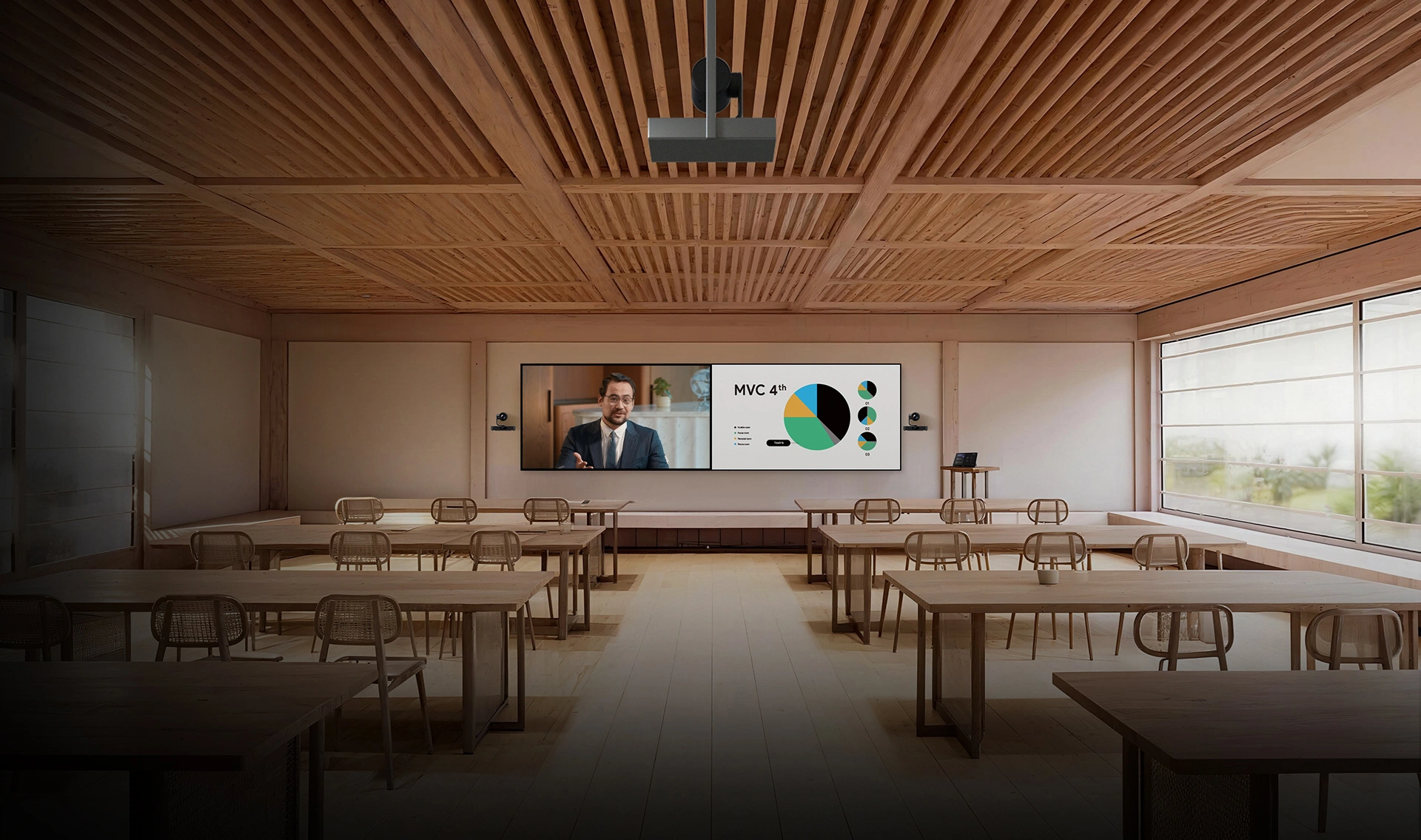
- ● Classrooms and Training Halls: Lecture and training spaces often have instructors at the front plus participants spread across the room. The S98 can cover both “front-of-room” and “audience” views simultaneously. Its Presenter Tracking and IntelliFrame modes keep the instructor and any student who speaks in sharp view (even from 20+ meters away. Multiple cameras can be positioned to catch side conversations or roundtable discussions. Meanwhile, each in-person attendee can be clearly heard via the built-in mics and any added ceiling mics, making remote interaction more natural. The image below illustrates a sample divisible boardroom setup with dual screens and multiple cameras working together:By covering every camera angle, the MVC S98 ensures that all participants feel present in hybrid meetings. In a training hall or large conference room, instructors can teach dynamically – pacing the stage or whiteboard – while S98 keeps them centered and legible on the Teams feed. In short, these scenarios become inclusive hybrid classrooms, not one-sided presentations.
- ● Executive Conference Rooms: Even unpartitioned boardrooms benefit. The multi-camera array gives presenters freedom to move. Intelligent framing ensures that whether a CEO is at the table or by a flipchart, the focus follows naturally. With 20x zoom and crystal-clear 4K resolution, every expression and detail is captured, reinforcing engagement on Teams.